
The Government of India has introduced the Electronic Overseas Citizen of India (e-OCI) card. This digital initiative allows non-resident Indians and foreign citizens of Indian origin to generate, store, and access their OCI card electronically directly on their mobile devices or laptops.
If you are wondering how to get an e-OCI card, whether you are a brand-new applicant or an existing physical booklet holder, this step-by-step guide covers the official process.
What is an e-OCI Card?
Before diving into the application steps, it is essential to understand what the e-OCI card is. In short, the e-OCI card is a digital representation of your physical OCI card issued by the Ministry of Home Affairs. It features a secure QR code containing your official particulars, making international travel and immigration checks faster and more convenient.
Key Takeaway: Your existing physical OCI booklet remains valid. However, downloading the e-OCI card gives you an extra digital layer of safety so you never have to worry about losing your paper documents while traveling.
How Existing OCI Holders Can Download the e-OCI Card (Free)
If you already possess a physical OCI booklet, you do not need to apply for a new card from scratch. Instead, you can generate and download your e-OCI card free of charge.
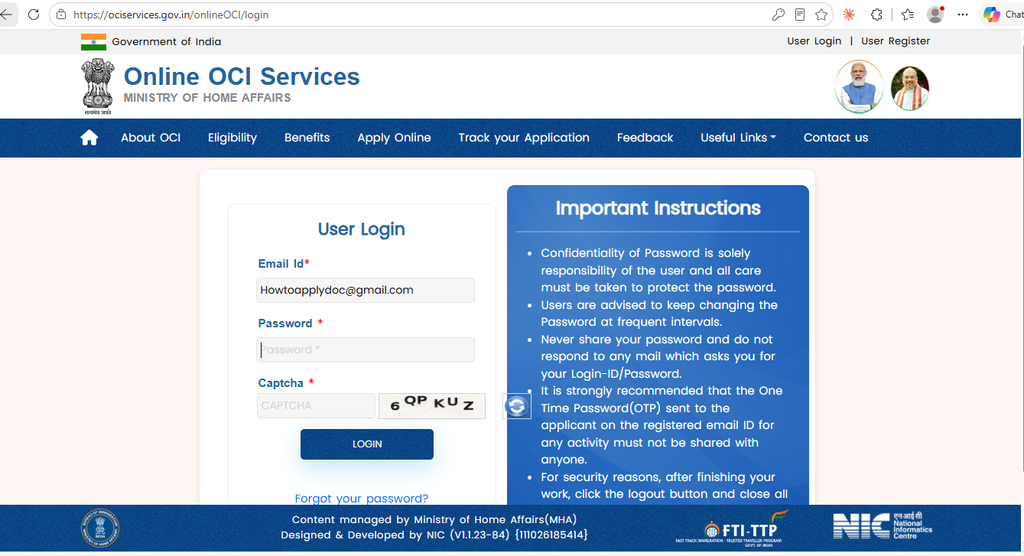
Step 1: Visit the Official OCI Portal
To begin, navigate directly to the official Government of India portal at ociservices.gov.in.
Step 2: Log In with Registered Details
Next, select the e-OCI Download section on the homepage. Enter the email address linked to your OCI record along with your OCI Registration Number or Passport Details.
Step 3: Verify via OTP
After submitting your details, a One-Time Password (OTP) will be sent to your registered email address or mobile phone number. Enter the OTP on the portal to confirm your identity.
Step 4: Generate and Save Your e-OCI
Once verified, click on “Generate e-OCI Card”. The portal will instantly generate a digital PDF version featuring your verified particulars and a secure QR code. Finally, download and save the PDF file on your device or print a copy for your travel documents.
How to Apply for a New e-OCI Card
If you do not have an existing OCI card and are applying for the first time, all newly approved applicants automatically receive the e-OCI digital card.
Check Your Eligibility
First, confirm that you are eligible under Indian Citizenship laws. You qualify if you were previously an Indian citizen, are a child/grandchild of an Indian citizen, or are married to an Indian citizen/OCI cardholder for at least two continuous years.
Complete the Online Registration
Next, go to the official OCI portal and select New OCI Registration. Fill out Part A with your personal details and Part B with background/family information.
Upload Required Documents & Photographs
After filling in the form, upload clear scanned copies of your foreign passport, proof of Indian origin, photo, and digital signature.
Submit at VFS / Indian Mission & Pay Fees
Then, book an appointment at your local VFS Global center, BLS center, or Indian Mission. Submit physical copies of your documents for verification and pay the application fee.
Download Your Digital e-OCI Card
Finally, track your application status online. Upon approval, log back into the portal to download your official e-OCI card directly to your phone.
Frequently Asked Questions About e-OCI
Is there a fee to download the e-OCI card?
No, downloading the e-OCI card for existing holders is completely free of charge.
Do I still need my physical passport to travel?
Yes, absolutely. Your passport remains your primary international travel document. The e-OCI card serves as a lifelong digital entry visa to India.
What if the portal says “Record Not Found”?
If this happens, double-check that the details you entered match your original OCI registration. In case you recently updated your passport, ensure you have submitted a passport update request via OCI Miscellaneous Services first.
When applying for a new Overseas Citizen of India (OCI) card, the mandatory documents depend on whether you are applying based on your own former Indian citizenship, through your parents/grandparents, or through an Indian spouse.
Below is the structured document checklist required for each category.
1. General Documents (Mandatory for ALL Applicants)
Every applicant must upload digital copies during online registration and present physical copies at the VFS Global / BLS center:
Current Foreign Passport: Must have at least 6 months of remaining validity.
Naturalization Certificate: Proof of acquiring your current citizenship.
Digital Photograph: 2×2 inch (51mm x 51mm) photo on a white background following strict ICAO guidelines.
Digital Signature / Thumb Impression: Uploaded image of your signature (or left thumb impression for minors/those who cannot sign).
Proof of Address: Utility bill (electricity, gas, water), lease agreement, or driver’s license showing your current residential address.
2. Category-Specific Proofs of Indian Origin
In addition to the general documents, you must provide proof of eligibility based on your application path:
Path A: Applying Based on Former Self-Citizenship
Cancelled Indian Passport: Copy of the bio-pages and the official cancellation stamp.
Surrender Certificate: Official certificate confirming the surrender of your Indian passport (mandatory if surrendered in/after 2010).
Alternative Proofs (if passport is lost/unavailable): Nativity Certificate, Domicile Certificate, or Land/Revenue records from a First-Class Magistrate in India.
Path B: Applying Based on Parents or Grandparents
Full-Version Birth Certificate: Must show both parents’ names (must be apostilled if issued outside India or the residence country).
Parents’/Grandparents’ Indian Origin Proof: Cancelled Indian passport, Surrender Certificate, or existing OCI card.
Marriage Certificate of Parents: To prove family lineage.
Path C: Minor Applicants
Minor’s Birth Certificate: Showing names of both parents.
Parents’ Passports & Visas: Copies of current passports and valid immigration status/OCI cards for both parents.
Joint Consent / Declaration Form: Signed by both parents.
In case of single/divorced parents: Court-ordered sole custody decree.
Path D: Applying Based on Indian Spouse
(Marriage must have been registered for at least 2 continuous years prior to application)
Registered Marriage Certificate: Apostilled if issued by a foreign government.
Spouse’s Proof of Indian Origin: Valid Indian Passport or OCI Card of the spouse.
Spouse Consent Letter & Form S: Signed declaration from the Indian origin spouse granting permission.
Official OCI Photo Specifications
OCI photo guidelines strictly follow ICAO standards.
Important Note: OCI photo requirements are completely different from Indian passport photos. Do not use standard rectangular Indian passport photos.
Physical Photo Requirements (Hard Copies)
Dimensions: 2 inches x 2 inches (51\text{ mm} \times 51\text{ mm}) square format.
Background: Plain light-colored background (e.g., off-white, light gray, or cream).
Face Coverage: Your face (from top of head to chin) must cover 80% of the frame (25\text{ mm} to 35\text{ mm}).
Pose & Expression: Full face centered, neutral expression, mouth closed, eyes open and looking directly at the camera. No smiles or visible teeth.
Recency & Quality: Printed on high-quality glossy/matte photo paper and taken within the last 6 months.
Digital Upload Requirements (ociservices.gov.in)
Format: JPEG or JPG.
Aspect Ratio: Strictly 1:1 square.
Dimensions: Minimum 200 \times 200\text{ pixels}; Maximum 900 \times 900\text{ pixels}.
File Size: Maximum 200 KB.
Signature/Thumb Image: Must also be uploaded as a JPEG under 200 KB (1:3 or 1:2 aspect ratio width-to-height).